Aviation Weather HandbookFAA-H-8083-28B
Chapter 25
Analysis
25 pagesPages 25-1–25-25
25.1 Introduction
The second of five types of aviation weather information discussed in this handbook are analyses. Analyses of weather information are an enhanced depiction and/or interpretation of observed weather data. Prior to the 1990s, most analysis charts were hand-drawn by forecasters. Today’s analyses are automated, and depending on the weather information provider (e.g., the NWS, commercial weather services, and flight planning services), the appearance and content of these analyses will vary. This chapter will only focus on those analyses produced by the NWS and made available on various websites, including the AWC, the WPC, the Ocean Prediction Center (OPC), and the AAWU. For this handbook, analyses include the following:
Surface Chart Analysis.
Upper Air Analysis.
Freezing Level Analysis.
Icing Analysis [Current Icing Product (CIP)].
Turbulence [Graphical Turbulence Guidance (GTG)] Analysis.
Real-Time Mesoscale Analysis (RTMA).
We recognize that in today’s world, an increasing amount of analyzed weather information is available from multiple sources. These sources provide a wide range of meteorological data, such as surface observations, radar, and satellite imagery, and use advanced techniques to combine these inputs into accurate, high-resolution weather analyses products. These high-resolution analyses products can provide METAR-equivalent data (ceiling, visibility, temperature, dew point pressure, wind direction, wind speed) across grid that extend well beyond airport locations.
Analyzed Surface Weather information refers to weather data from sources other than the currently approved ground-based ASOS and AWOS weather reporting systems. Alternate sources may include:
Model-derived, gridded estimates of current conditions,
In situ observations from novel data sources, such as UAS or weather cameras, and
Surface sensors that are currently not approved for producing METARs. FAA Flight Standards has investigated the use of Analyzed Weather Information since 2015 as an alternative source of weather information when elements are missing from ASOS and AWOS reports. In May of 2024, Flight Standards completed a Safety Risk Management Panel (SRMP) to assess the risk of using Analyzed Weather Information (for all required weather elements) for Part 121 and 135 operations when sensed weather is not available (i.e., no ASOS/AWOS sensor) or missing (i.e., incomplete weather information from an ASOS/AWOS METAR). The Safety Risk Management Document (SRMD) concludes that implementation of identified mitigations to address performance variability of the analyzed weather information (to include latency and geographic variability), all hazards would be reduced to a low risk level, equivalent to current operational standards in the NAS regarding Weather Information. Results of the SRMP supports a path forward to enable the use of Analyzed Weather as an approved source of weather information when weather information is not available from an ASOS or AWOS.
At terminal locations that provide METARs, occasionally the information required for flight operations is missing and this impacts the ability to sustain operations. Improved back-up information from an approved weather source is required for efficiency and to sustain safe operations. In an effort to mitigate these disruptions, since 2015, Flight Standards approved the use of NWS Real-Time Mesoscale Analysis (RTMA) for operators to use temperature information at airports where an ASOS/AWOS has failed. In early 2024, Flight Standards also approved the use of Altimeter Setting (pressure) information at airports where an ASOS/AWOS has failed. More details on RTMA are in Section 25.7. With the assumption that a METAR is representative of weather within five miles of the terminal area where the METAR is taken, this equates to two percent of Alaska and three percent of the lower 48 contiguous United States having “Certified Weather” information from “Approved Sources” at airports where a METAR is produced. Certified weather systems from approved sources are too expensive to fill these gaps across the NAS. However, utilizing existing FAA certified sensors from approved sources with these other various types of meteorological data from multiple sources could easily help fill this gap.
25.2 Weather Charts
A weather chart is a map on which data and analyses are presented that describe the state of the atmosphere over a large area at a given moment in time.
The possible variety of such charts is enormous, but in meteorological history there has been a more or less standard set of charts, including surface charts and the constant-pressure charts of the upper atmosphere. Because weather systems are three dimensional (3D), both surface and upper air charts are needed. Surface weather charts depict weather on a constant-altitude (usually sea level) surface, while upper air charts depict weather on constant-pressure surfaces.
The NWS produces many weather charts that support the aviation community.
25.2.1 Weather Observation Sources
Weather analysis charts can be based on observations from a variety of data sources (see Figure 25-1), including:
Land surface [e.g., ASOS, AWOS, and the National Mesonet].
Marine surface [e.g., ship, buoy, Coastal-Marine Automated Network (C-MAN), and tide gauge].
Sounding [e.g., radiosonde, dropsonde, pibal, profiler, and Doppler weather radar Velocity Azimuth Display (VAD) wind profile].
Aircraft [e.g., AIREPs and PIREPs), AMDAR, and Aircraft Communications Addressing and Reporting System (ACARS)].
Satellite [e.g., GOES sensors that provide temperature, moisture, and wind (through cloud movement)].
Note: Human observers can augment automated reports.
Figure 25-1. Weather Observation Sources
25.2.2 Analysis
Analysis is the drawing and interpretation of the patterns of various elements on a weather chart. It is an essential part of the forecast process. If meteorologists do not know what is currently occurring, it is nearly impossible to predict what will happen in the future. Computers have been able to analyze weather charts for many years and are commonly used in the process. However, computers cannot interpret what they analyze. Thus, many meteorologists still perform a subjective analysis of weather charts when needed.
25.2.2.1 Analysis Procedure
The analysis procedure is similar to drawing in a dot-to-dot coloring book. Just as one would draw a line from one dot to the next, analyzing weather charts is similar in that lines of equal values, or isopleths, are drawn between dots representing various elements of the atmosphere. An isopleth is a broad term for any line on a weather map connecting points with equal values of a particular atmospheric variable. See Table 25-1 for common isopleths.
Table 25-1. Common Isopleths
| Isopleth | Variable | Definition |
|---|---|---|
| Isobar | Pressure | A line connecting points of equal or constant pressure. |
| Contour Line (also called Isoheight) | Height | A line of constant elevation above MSL of a defined surface, typically a constant-pressure surface. |
| Isotherm | Temperature | A line connecting points of equal or constant temperature. |
| Isotach | Wind Speed | A line connecting points of equal wind speed. |
| Isohume | Humidity | A line drawn through points of equal humidity. |
| Isodrosotherm | Dewpoint | A line connecting points of equal dewpoint. |
The weather chart analysis procedure begins with a map of the plotted data, which is to be analyzed (see Figure 25-2). It is assumed that bad or obviously incorrect data has been removed before beginning the analysis process. At first, the chart will appear to be a big jumble of numbers. However, when the analysis procedure is complete, patterns will appear, and significant weather features will be revealed.
25.2.2.1.1 Step 1: Determine the Optimal Contour Interval and Values to be Analyzed
The first step in the weather chart analysis procedure is to identify the maxima and minima data values and their ranges to determine the optimal contour interval and values to be analyzed. The best contour interval will contain enough contours to identify significant weather features, but not so many that the chart becomes cluttered. Each weather element has a standard contour interval on NWS weather charts, but these values can be adjusted in other analyses as necessary.
Figure 25-2. Analysis Procedure Step 1: Determine the Optimal Contour Interval and Values to be Analyzed
Every contour value must be evenly divisible by the contour interval. So, for example, if the contour interval is every four units, a 40-unit contour is all right, but a 41-unit contour is not. In the surface pressure analysis example shown in Figure 25-2, an isobar analysis will be performed beginning at a value of 992 mb and using a contour interval of four mb, which is standard on the NWS Surface Analysis Chart.
25.2.2.1.2 Step 2: Draw the Isopleths and Extrema
The second step is to draw the isopleths and extrema (maxima and minima) using the beginning contour value and contour interval chosen in the first step (see Figure 25-3). It is usually easiest to begin drawing an isopleth either at the edge of the data domain (edge of the chart) or at a data point that matches the isopleth value being drawn. Interpolation must often be used to draw isopleths between data points and determine the extrema. “Interpolate” means to estimate a value within an interval between known values. When drawing isopleths and extrema on a weather chart, certain rules must be followed:
The analysis must remain within the data domain. Analysis must never be drawn beyond the edge of the chart where there are no data points. That would be guessing.
Isopleths must not contain waves and kinks between two data points. This would indicate a feature too small to be supported by the data. Isopleths should be smooth and drawn generally parallel to each other.
3. When an isopleth is complete, all data values must be higher than the isopleth’s value on one side of the line and lower on the other.
4. A closed-loop isopleth must contain an embedded extremum (maximum or minimum).
When a maximum (minimum) is identified, data values must decrease (increase) in all directions away from it.
6. Isopleths can never overlap, intersect, or cross over extrema. It is impossible for one location to have more than one data value simultaneously.
7. Each isopleth must be labeled. A label must be drawn wherever an isopleth exits the data domain. For closed-loop isopleths, a break in the loop must be created where a label can be drawn. For very long and/or complex isopleths, breaks should be created where additional labels can be drawn, as necessary.
8. Extrema must be labeled. Extrema are often denoted by an “x” embedded within a circle. Beneath the label, the analyzed value of the field must be written and underlined.
Isopleths and labels should not be drawn over the data point values. If necessary, breaks in the isopleths should be created so that the data point values can still be read.
Figure 25-3. Analysis Procedure Step 2: Draw the Isopleths and Extrema
25.2.2.1.3 Step 3: Identify Significant Weather Features
The third (and final) step is to interpret significant weather features. The conventional labels for extrema are H (high) and L (low) for pressure and height, W (warm) and K (cold) for temperature (they stand for the German words for warm and cold), and X (maxima) and N (minima) for all other elements. Tropical storms, hurricanes, and typhoons are low-pressure systems with their names and central pressures denoted. Troughs, ridges, and other significant features are often identified as well. For surface analysis charts, positions and types of fronts are shown by symbols in Figure 25-4. The symbols on the front indicate the type of front and point in the direction toward which the front is moving. Two short lines across a front indicate a change in front type.
Table 25-2 provides the most common weather chart symbols. In the surface pressure analysis in Figure 25-4, a high, low, trough, and ridge have been identified.
Table 25-2. Common Weather Chart Symbols
| Feature | Symbol | Definition |
|---|---|---|
| Low |  | A minimum of atmospheric pressure in two dimensions (closed isobars) on a surface chart, or a minimum of height (closed contours) on a constant-pressure chart. Also known as a cyclone. |
| High |  | A maximum of atmospheric pressure in two dimensions (closed isobars) on a surface chart, or a maximum of height (closed contours) on a constant-pressure chart. Also known as an anticyclone. |
| Trough | 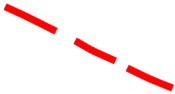 | An elongated area of relatively low atmospheric pressure or height. |
| Ridge | 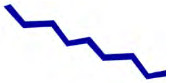 | An elongated area of relatively high atmospheric pressure or height. May also be used as reference to other meteorological quantities, such as temperature and dewpoint. |
Figure 25-4. Analysis Procedure Step 3: Interpret Significant Weather Features
25.2.3 Surface Analysis Chart
The WPC in College Park, MD, produces a variety of surface analysis charts for North America that are available on their website. The WPC’s surface analysis is also available on the AWC’s and other providers’ websites.
A surface chart (also called surface map or sea level pressure chart) is an analyzed chart of surface weather observations. Essentially, a surface chart shows the distribution of sea level pressure (lines of equal pressure are isobars). Hence, the surface chart is an isobaric analysis showing identifiable, organized pressure patterns. The chart also includes the positions of highs, lows, ridges, and troughs, and the location and character of fronts and various boundaries, such as drylines, outflow boundaries, and sea breeze fronts. Although the pressure is referred to as MSL, all other elements on this chart are presented as they occur at the surface point of observation. A chart in this general form is the one commonly referred to as the weather map. See Figure 25-5 for a schematic example of a surface chart.
Figure 25-5. Schematic of Surface Chart Pressure Patterns
Figure 25-7 is one example of several surface analysis products available on the WPC’s website. Some of the WPC’s surface analysis charts are combined with radar or satellite imagery (see Figure 25-8 and Figure 25-9) as well as having different background features (e.g., terrain).
25.2.3.1 Issuance
The WPC issues surface analysis charts for North America eight times daily, valid at 00, 03, 06, 09, 12, 15, 18, and 21 UTC.
25.2.3.2 Analysis Symbols
Figure 25-6 shows analysis symbols used on NWS surface analysis charts.
Figure 25-6. NWS Surface Analysis Chart Symbols
25.2.3.3 Examples
Figure 25-7. Example of a Surface Chart with Surface Observations
Figure 25-8. Surface Analysis with Radar Composite Example
Figure 25-9. Surface Analysis with Satellite Composite Example
25.2.3.4 Station Plot Models
Land, ship, buoy, and C-MAN stations are plotted on the chart to aid in analyzing and interpreting the surface weather features. These plotted observations are referred to as station models. Some stations may not be plotted due to space limitations. However, all reporting stations are used in the analysis. Figure 25-10 and Figure 25-11 contain the most commonly used station plot models used in surface analysis charts.
Figure 25-10. NWS Surface Analysis Chart Station Plot Model
Figure 25-11. NWS Surface Analysis Chart Ship/Buoy Plot Model
The WPC also produces surface analysis charts specifically for the aviation community. Figure 25-12 contains the station plot model for these charts.
Figure 25-12. NWS Surface Analysis Chart for Aviation Interests Station Plot Model
25.2.3.4.1 Station Identifier
The format of the station identifier depends on the observing platform:
Ship: Typically, four or five characters. If five characters, then the fifth will usually be a digit.
Buoy: Whether drifting or stationary, a buoy will have a five-digit identifier. The first digit will always be a 4.
C-MAN: Usually located close to coastal areas. Their identifier will appear like a five-character ship identifier; however, the fourth character will identify off which state the platform is located.
Land: Land stations will always be three characters, making them easily distinguishable from ship, buoy, and C-MAN observations.
25.2.3.4.2 Temperature
The air temperature is plotted in whole degrees Fahrenheit.
25.2.3.4.3 Dewpoint
The dewpoint temperature is plotted in whole degrees Fahrenheit.
25.2.3.4.4 Weather
A weather symbol is plotted if, at the time of observation, precipitation is either occurring or a condition exists causing reduced visibility.
Figure 25-13 contains a list of the most common weather symbols.
Figure 25-13. NWS Surface Analysis Chart Common Weather Symbols
25.2.3.4.5 Wind
Wind is plotted in increments of 5 kt. The wind direction is referenced to true north and is depicted by a stem (line) pointed in the direction from which the wind is blowing. Wind speed is determined by adding the values of the flags (50 kt), barbs (10 kt), and half-barbs (5 kt) found on the stem. If the wind is calm at the time of observation, only a single circle over the station is depicted.
Figure 25-14 includes some sample wind symbols.
Figure 25-14. NWS Surface Analysis Chart Sample Wind Symbols
25.2.3.4.6 Ceiling
Ceiling is plotted in hundreds of feet AGL.
25.2.3.4.7 Visibility
Surface visibility is plotted in whole statute miles.
25.2.3.4.8 Pressure
Sea level pressure is plotted in tenths of millibars, with the first two digits (generally 10 or 9) omitted. For reference, 1,013 mb is equivalent to 29.92 inHg. Below are some sample conversions between plotted and complete sea level pressure values.
- 410 1,041.0 mb
- 103 1,010.3 mb
- 987 998.7 mb
- 872 987.2 mb
25.2.3.4.9 Pressure Trend
The pressure trend has two components, a number and a symbol, to indicate how the sea level pressure has changed during the past three hours. The number provides the three-hour change in tenths of millibars, while the symbol provides a graphic illustration of how this change occurred. Figure 25-15 contains the meanings of the pressure trend symbols.
Figure 25-15. NWS Surface Analysis Chart Pressure Trends
25.2.3.4.10 Sky Cover
The approximate amount of sky cover can be determined by the circle at the center of the station plot. The amount that the circle is filled reflects the amount of sky covered by clouds. Figure 25-16 contains the common cloud cover depictions.
Figure 25-16. NWS Surface Analysis Chart Sky Cover Symbols
25.2.3.4.11 Water Temperature
Water temperature is plotted in whole degrees Fahrenheit.
25.2.3.4.12 Swell Information
Swell direction, period, and height are represented in the surface observations by a six-digit code. The first two digits represent the swell direction, the middle digits describe the swell period (in seconds), and the last two digits are the swell’s height (in half meters).
090703:
09: The swell direction is from 90° (i.e., it is coming from due east).
07: The period of the swell is seven seconds.
03: The height of the swell is three half m.
271006:
27: The swell direction is from 270° (due west).
10: The period is 10 seconds.
06: The height of the swell is six half m.
25.2.3.4.13 Wave Information
Period and height of waves are represented by a five-digit code. The first digit is always 1. The second and third digits describe the wave period (in seconds), and the final two digits give the wave height (in half meters).
10603:
1: A group identifier. The first digit will always be 1.
06: The wave period is six seconds.
03: The wave height is three half m.
10515:
1: A group identifier.
05: The wave period is five seconds.
15: The wave height is 15 half m.
In some charts by the OPC, only the wave height (in feet) is plotted.
25.2.4 Unified Surface Analysis Chart
The NWS Unified Surface Analysis Chart is a surface analysis product produced collectively and collaboratively by the NWS WPC, the OPC, the NHC, and WFO Honolulu. The chart contains an analysis of isobars, pressure systems, and fronts.
This chart is available on the OPC’s website. Users can zoom in by clicking an area on the map to enlarge (see Figure 25-17 and Figure 25-18) and show station plot models (see Section 25.2.3.4).
25.2.4.1 Issuance
The Unified Surface Analysis Chart is issued four times daily for valid times 00, 06, 12, and 18 UTC.
Figure 25-17. Unified Surface Analysis Chart Example
Figure 25-18. Unified Surface Analysis Chart Example (Enlarged Area)
25.2.4.2 Analysis Symbols
Unified Surface Analysis Charts use the symbols shown in Figure 25-6.
25.2.5 AAWU Surface Chart
The NWS Unified Surface Analysis Chart covers the Alaska area. The AAWU also provides a fixed area image of the Unified Surface Analysis Chart centered over Alaska (see Figure 25-19). This chart is available from the AAWU’s website.
Figure 25-19. Unified Surface Analysis Chart Example with Fixed Area Coverage over Alaska
25.3 Upper Air Analysis
An upper air chart (also known as a constant-pressure chart or an isobaric chart) is a weather map representing conditions on a surface of equal atmospheric pressure. A constant-pressure surface is a surface along which the atmospheric pressure is everywhere equal at a given instant. For instance, the 500 mb constant-pressure surface has a pressure of 500 mb everywhere on it. For example, a 500 mb chart will display conditions at the level of the atmosphere at which the atmospheric pressure is 500 mb. Constant-pressure charts usually contain plotted data and analyses of the distribution of height of the surface (contours), wind (isotachs), temperature (isotherms), and sometimes humidity (isohumes). The height above sea level at which the pressure is that particular value may vary from one location to another at any given time, and also varies with time at any one location, so it does not represent a surface of constant altitude/height (i.e., the 500 mb level may be at a different height above sea level over Dallas than over New York at a given time and may also be at a different height over Dallas from one day to the next). The height (altitude) of a constant-pressure surface varies primarily due to temperature; these heights can be measured by a rawinsonde.
Constant-pressure charts are most commonly known by their pressure value (see Table 25-3 for common constant pressure levels). For example, the 1,000 mb chart (which closely corresponds to the surface chart), the 850 mb chart, 700 mb chart, 500 mb chart, etc.
A contour analysis (see Figure 25-20 and Figure 25-21) can reveal highs, ridges, lows, and troughs aloft just as the surface chart shows such systems at the surface. These systems of highs/ridges and lows/troughs are called pressure waves. These pressure waves are similar to waves seen on bodies of water. They have crests (ridges) and valleys (troughs) and are in constant movement.
Figure 25-20. Schematic of 500 mb Constant-Pressure Chart
Table 25-3. Common Constant-Pressure Charts
| Chart | Pressure Altitude (approximate) | |
|---|---|---|
| Feet (ft) | Meters (m) | |
| 100 mb | 53,000 ft | 16,000 m |
| 150 mb | 45,000 ft | 13,500 m |
| 200 mb | 39,000 ft | 12,000 m |
| 250 mb | 34,000 ft | 10,500 m |
| 300 mb | 30,000 ft | 9,000 m |
| 500 mb | 18,000 ft | 5,500 m |
| 700 mb | 10,000 ft | 3,000 m |
| 850 mb | 5,000 ft | 1,500 m |
| 925 mb | 2,500 ft | 750 m |
25.3.1 Issuance
The NWS provides data to produce upper air analysis charts.
25.3.1.1 Examples
See Figure 25-21 for an example of a 500 mb chart.
Figure 25-21. Example of a 500 mb Constant-Pressure Chart
Constant pressure level forecasts are used to provide an overview of weather patterns at specified times and pressure altitudes and are the source for wind and temperature aloft forecasts. Pressure patterns cause and characterize much of the weather. Typically, lows and troughs are associated with clouds and precipitation, while highs and ridges are associated with fair weather, except in winter when valley fog may occur. The location and strength of the jet stream can be viewed at 300 mb, 250 mb, and 200 mb levels.
25.3.2 Radiosonde Observation (Weather Balloon) Analysis
A common means of analyzing radiosonde observations is the skew-T diagram (see Figure 25-22). Skew-T diagrams are primarily intended for, and used by, meteorologists as part of their analyses of the atmosphere. For example, the skew-T diagram can be used to:
Determine the freezing level (or levels).
Determine the stability of the atmosphere.
Determine the potential for severe weather.
Determine the height and depth of inversions.
Infer cloud bases, tops, and layers.
Determine soaring conditions.
25.3.2.1 Issuance
Skew-T diagrams are primarily intended for, and used by, meteorologists as part of their analyses of the atmosphere and formulation of various forecasts.
Skew-T diagrams are available from the NWS NCO. Their “Model Analyses and Guidance” website contains a user’s guide that provides descriptions, details, and examples of the various products, including the skew-T.
25.3.2.2 Format
The skew-T diagram provided on the NWS NCO “Model Analyses and Guidance” website uses the following format (other weather providers and websites may have different formats, especially colors):
Horizontal axis is temperature in degrees Celsius, skewed to the right, labeled -20, 0, and 20 (Celsius).
Vertical axis is pressure levels in millibars, labeled 1,000 (near sea level) to 100 (approximately 53,000 ft MSL).
Bold, solid red line represents the temperature profile over the station taken from the radiosonde observation (weather balloon).
Bold, solid green line represents the dewpoint profile.
Wind aloft is shown on the far-right side.
Figure 25-22. Skew-T Diagram Example
25.3.2.3 Examples
Two examples are provided below: a multiple freezing level example (see Figure 25-23) and a cloud top example (see Figure 25-24).
25.3.2.3.1 Multiple Freezing Level Example
Note how the temperature profile (bold red line) crosses the 0-degree temperature line (also known as an isotherm) five times (near 900 mb, 860 mb, 775 mb, 725 mb, and 675 mb).
Figure 25-23. Skew-T Diagram—Multiple Freezing Level Example
25.3.2.3.2 Cloud Top Example
Figure 25-24 is the radiosonde observation from Vandenberg Space Force Base (VSFB), California, for 1200 UTC for a typical coastal stratus cloud.
At about 950 mb, the temperature profile (bold red line) and dewpoint profile (bold green line) almost touch each other. This is the profile of a cloud top. The temperature and dewpoint quickly diverge, representing a change from the cool, moist air (and associated stratus cloud) to the dry and warmer air (cloud free) above.
Figure 25-24. Skew-T Diagram—Cloud Top Example
25.4 Freezing Level Analysis
The freezing level is the lowest altitude in the atmosphere over a given location at which the air temperature reaches 0°C. This altitude is also known as the height of the 0°C constant-temperature surface. The initial analysis is updated hourly. The colors represent the height in hundreds of feet above MSL of the lowest freezing level. Regions with white indicate the surface and the entire depth of the atmosphere are below freezing. Hatched or spotted regions (if present) represent areas where the surface temperature is below freezing with multiple freezing levels aloft.
More information on the freezing level forecast graphics is available on the AWC’s website. See Section 27.12 for additional information on freezing level forecast graphics.
25.5 Icing Analysis [Current Icing Product (CIP)]
The NWS produces icing products that are derived from NWS computer model data combined with observations with no forecaster modifications. One of these products is the CIP. The CIP combines weather satellite, weather radar, METAR, PIREPs and NWS model data to provide an hourly 3D diagnosis of the icing environment. This information is displayed on a suite of graphics available for the CONUS, much of Canada and Mexico, and their respective coastal waters. The CIP [and its forecast counterpart Forecast Icing Product (FIP) (see Section 27.13)] provide a broad-brush approach to describing icing intensity using estimated liquid water content, drop size, and temperature to depict ice accumulation rate. The intensity of ice accumulation rate varies by aircraft wing shape. Hence, the icing intensity categories depicted in CIPs and FIPs (e.g., none, light, moderate, heavy) is only a broad-brushed indication of ice accumulation rate, and not necessarily of aircraft performance. The icing terms used in SIGMETs and AIRMETs do refer to icing impact on aircraft. CIPs will continue to evolve over the coming years with increased model resolutions, additional horizontal layers, and improvements to the algorithms and/or data sets used to produce the products. Along with these improvements may come a change in references to the product update version. Users can find additional information on these products and any changes on the AWC’s website.
The CIP suite as it appears on the AWC’s website consists of three graphics, including:
Icing Probability (see Section 27.13.1 for additional information).
Icing Severity (see Section 27.13.2 for additional information).
Icing Severity plus SLD (see Section 27.13.3 for additional information). The CIPs are generated for select altitudes from 1,000 ft MSL to FL300.
The CIPs can be viewed at single altitudes and FLs or as a composite of all altitudes from 1,000 ft MSL to FL300, which is referred to as the “maximum” or “max.”
The CIP can be used to identify the latest and forecast 3D probability and intensity of ice accumulation rate. The CIP should be used in conjunction with the report and forecast information contained in an AIRMET and SIGMET.
The Icing Severity plus SLD product can help in determining the threat of SLD, which is particularly hazardous to some aircraft.
Icing PIREPs are plotted on a single-altitude CIP graphic if the PIREP is within 1,000 ft of the selected altitude and has been observed within 75 minutes of the chart’s valid time. Icing PIREPs for all altitudes (i.e., 1,000 ft MSL to FL300) are displayed, except negative reports are omitted to reduce clutter. The PIREP legend is located on the bottom of each graphic.
Finally, while the “C” in CIP stands for “current,” the product does not show the current conditions, rather it depicts the computer’s expected conditions at the valid time shown on the product. This valid time can be an hour old or more depending on when it is received by the user.
See Section 27.13 for additional information on the FIP.
25.6 Turbulence (Graphical Turbulence Guidance Nowcast (GTG-N))
The GTG Nowcast (GTG-N) product has been developed as a tactical aid for aviation. GTG-N provides a nowcast of the current turbulent state of the atmosphere over the CONUS in near real-time, updating every 15 minutes. The basis for the nowcast is the most recently available short-term (one-hour) forecast from the GTG product whose valid time is closest to the current update time. Recent observations of turbulence are then used to update the GTG forecast and create a blended nowcast (expressed as EDR). Current inputs include PIREPs, automated in situ EDR reports, and EDR estimated from ground-based radar observations via the Next-Generation Radar (NEXRAD) Turbulence Detection Algorithm (NTDA). In future upgrades, lightning, wind/gust observations from METARs, and EDR derived from ADS-B vertical rate data will be assimilated as well.
GTG-N is available at 100 ft MSL, 1000 ft MSL, then every 1000 ft up to FL500. See Section 27.14 for additional information on the GTG forecast.
25.7 Real-Time Mesoscale Analysis (RTMA)
RTMA is an hourly analysis system by the NWS’ Environmental Modeling Center that produces analyses of surface weather elements. The FAA has determined that RTMA temperature and altimeter setting information is a suitable replacement for missing temperature and altimeter setting observations for a subset of airports. RTMA temperature and altimeter setting information is intended for use by operators, pilots, and aircraft dispatchers when an airport lacks a surface temperature and/or altimeter setting report from an automated weather system (e.g., ASOS or AWOS sensor) or human observer. Airports with RTMA data available are located in Alaska, Guam, Hawaii, Puerto Rico, and the CONUS. RTMA is issued by the NWS every hour, 24 hours a day. Temperatures and altimeter settings are reported for an airport station including the latitude and the longitude. Temperatures are reported in degrees Celsius. Altimeter setting is reported in inches of mercury. See Figure 25-25 for an example RTMA temperature and altimeter setting report.
25.7.1 Adjustments
The values found at the RTMA site are 95 percent accurate throughout the United States for both temperature and altimeter setting when using the following mitigations:
Temperature requires adding 4°C to the RTMA-derived temperature.
Altimeter setting requires increasing the minimum descent altitude (MDA) or decision height (DH) value on the approach chart by 100 ft and increasing the required flight visibility minimums by ½ SM.
*****************************************************************
RTMA 2m-temperature (degrees Celsius) and altimeter setting
(inHg)
COMPUTED: 1239Z 25 Jan 2024
VALID: 1239Z 25 Jan 2024 to 1339Z 25 Jan 2024
*****************************************************************
Station Lat Lon 2m-T ALT
KABE 40.65 -75.44 3.43 30.19
KABI 32.41 -99.68 7.31 30.08
KABQ 35.04 -106.61 1.67 N/A
KABR 45.45 -98.42 -2.06 30.02
KABY 31.54 -84.19 19.07 30.15
KACK 41.25 -70.06 8.98 30.14
KACT 31.61 -97.23 10.00 30.06
KACV 40.98 -124.11 9.74 30.22
KACY 39.46 -74.58 11.59 30.17
KADS 32.97 -96.84 8.69 N/A
KAEX 31.33 -92.55 15.29 29.96
KAFW 32.99 -97.32 8.40 30.06
KAGS 33.37 -81.96 18.85 30.21
KAHN 33.95 -83.33 16.51 30.23
KAIA 42.05 -102.80 -4.11 29.94
KALB 42.75 -73.80 3.18 30.09
KALN 38.89 -90.05 3.02 30.12
KALO 42.56 -92.40 1.03 30.10
Figure 25-25. RTMA Surface Temperature and Altimeter Setting Example